 Skip to content
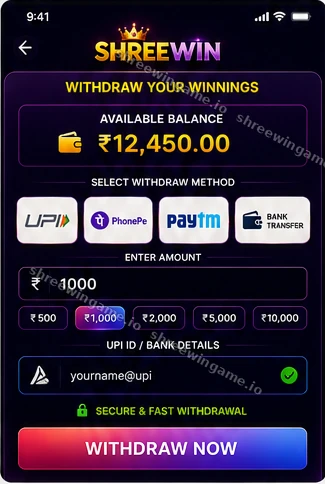
The ShreeWin Withdrawal guide explains how users can prepare a withdrawal request, verify recipient and account details, understand common pending or rejected statuses, and reduce the risk of payment or security mistakes. Withdrawal methods, limits, verification requirements, and processing times may change, so always review the current information shown in the live ShreeWin wallet before submitting a request.
ShreeWin Withdrawal: Quick Answer
Login to ShreeWin, open the wallet or withdrawal section, choose an available method, enter the amount, verify the receiving details, complete any required account verification, submit the request, and keep the withdrawal reference until the funds arrive.
Before Requesting a ShreeWin Withdrawal
A withdrawal can be delayed by incorrect recipient details, incomplete account verification, amount limits, or payment-provider processing. A careful pre-check is usually faster than trying to correct a request after it has been submitted.
- Confirm you are using your own account.
- Review the available withdrawal methods.
- Check minimum and maximum amounts.
- Verify the receiving account details.
- Review any account-verification requirements.
- Check the wallet balance and transaction history.
- Keep a record of the request after submission.
How to Withdraw from ShreeWin Step by Step
- Login to ShreeWin.
- Open Wallet or Withdrawal.
- Select a currently available withdrawal method.
- Enter the amount.
- Check the recipient details carefully.
- Complete any verification shown by the platform.
- Submit the request.
- Save the request ID, timestamp, or transaction reference.
- Monitor the withdrawal status before submitting another request.
ShreeWin Withdrawal Methods and Limits
The current platform determines which withdrawal methods are available and what limits apply. An older guide or screenshot should not be treated as permanent. Always check the live wallet before submitting a request.
| Withdrawal check | Why it matters |
|---|---|
| Method currently available | Availability can change by account or platform conditions |
| Recipient details | Incorrect information can delay or misdirect a payment |
| Amount limits | Requests outside current limits may fail |
| Verification status | Some requests may require additional account checks |
| Request reference | Useful for tracing a delayed withdrawal |
ShreeWin Withdrawal Pending
Pending usually means the request has been submitted but processing is not complete. The cause may be normal review, payment-provider processing, account verification, or temporary system load.
Do not assume that “pending” means the money is lost. First check the status shown in the wallet and any processing guidance displayed by the platform.
ShreeWin Withdrawal Failed or Rejected
| Status | Possible reason | What to check |
|---|---|---|
| Failed | Recipient/payment issue or provider failure | Review receiving details and request message |
| Rejected | Account requirement or limit not met | Read the rejection reason and current terms |
| Cancelled | User or system cancellation | Check wallet history before resubmitting |
| Completed but not received | External payment processing delay | Check receiving account and transaction reference |
Withdrawal Completed but Money Not Received
If ShreeWin shows a request as completed but the receiving account has not updated, check the destination details and payment-provider history. Keep the transaction reference and wait for any stated external processing period before escalating.
What If You Entered the Wrong Withdrawal Details?
If the request has not completed, check whether the platform offers a cancellation or correction option. If not, use the current support channel as soon as possible. Do not create multiple new withdrawals until you understand the first request’s status.
Withdrawal Verification and Account Security
Verification can be used to protect account funds, but users should still distinguish normal in-platform verification from suspicious requests received privately.
Never share these with another person
- ShreeWin password
- OTP codes
- Banking PIN
- Card security code
- Email password
- Remote access to your phone
Beware of Private “Withdrawal Release” Requests
Be cautious if someone in Telegram, chat, or social media says you must send money privately or share an OTP to “release” a withdrawal. Legitimate account steps should be clearly explained through the normal platform process.
ShreeWin Withdrawal Records to Keep
- Withdrawal request ID
- Requested amount
- Date and approximate time
- Selected method
- Receiving account identifier
- Final transaction reference when available
Deposit and Withdrawal Are Different Processes
The payment method used for deposits may not always be identical to the method used for withdrawals. Limits and verification rules can also differ. See the ShreeWin Deposit guide for funding information.
Withdrawals, Bonuses, and Terms
If funds are connected to a promotion, review the current bonus conditions. Some offers may have eligibility or turnover requirements. Do not assume a bonus balance is immediately withdrawable without checking the live terms. See ShreeWin Bonuses.
Responsible Withdrawal and Wallet Management
A withdrawal should not automatically become a reason to redeposit the same funds. If you have reached a planned stopping point, consider keeping the withdrawal outside the gaming wallet rather than immediately returning it to play.
ShreeWin Withdrawal FAQ
How do I withdraw money from ShreeWin?
Login, open the withdrawal area, select an available method, enter the amount, verify recipient details, complete required verification, submit the request, and keep the request reference.
Why is my ShreeWin withdrawal pending?
Pending can reflect normal processing, account checks, provider delays, or temporary system load. Review the live status before resubmitting.
What if the withdrawal shows completed but I have not received it?
Check the receiving account, payment-provider processing, and the final transaction reference. Use the current support channel if the expected processing period has passed.
Should I share an OTP to receive my withdrawal?
No. Keep OTPs private and enter them only in the intended verification field.
Can I cancel a withdrawal?
Cancellation availability depends on the current platform and request status. Check the live wallet options.
Where can I get ShreeWin withdrawal help?
Use the ShreeWin Contact page for the currently listed support channel and keep your transaction reference ready.
Related ShreeWin Guides
ShreeWin Deposit · Login · Bonuses · FAQ · Contact · Responsible Gaming
